
Note2Tabs Drum notation editor
Write drum notation online
Write drum beats and fills in your browser. Edit kick, snare, toms and cymbals, hear the groove with playback, and export your drum part as MIDI.
How it works
Open a drum track
Start a blank drum part in your browser. Guest mode lets you begin without an account.
Build the pattern
Place kick, snare and cymbal hits, then add toms or change the subdivision for a fill.
Play the groove
Listen back, repeat the passage and arrange the next section in the same project.
A workspace for beats, fills and complete parts
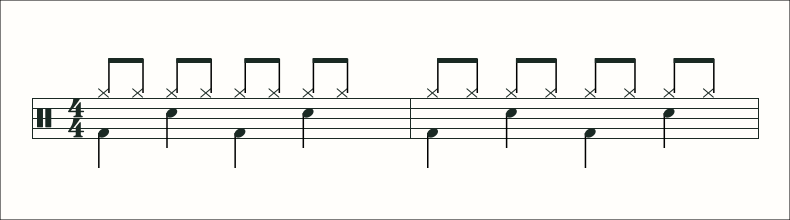
Write a simple backbeat or lay out an entire drum arrangement. The drum workspace keeps the kit voices separate so you can see what the hands and feet play together. Score view gives you readable percussion notation; the drum timeline lets you inspect the timing of individual hits.
Start with the pulse, add the snare pattern and place the cymbal subdivision. Playback helps you check the feel before copying the groove into the next bar or building a fill around it.
Keep fills connected to the next bar
A fill is useful when it leads cleanly into the following beat. Write the last bar of a section together with the first bar after it, listen through the transition and adjust the placement of the final tom or crash. Keep bass and other instruments in the project when you want to hear the arrangement together.
Write, repeat and practise
Loop a pattern while learning it, or change the practice playback speed to work through a difficult passage. Notes remain editable, so you can simplify a busy groove for a rehearsal and return to the full part later.
Save the part for your next session
Sign in to keep the project in your library. Export MIDI for production or a native project file for continuing in Note2Tabs. If the groove comes from a recording, start with drum transcription and edit the result here.
Explore drum transcriptionDrums guides
- How to Transcribe Drums from a Recording
Check kick, snare, cymbals and fills in layers, then keep the groove editable for practice or production.
- How to Read Drum Notation
Read kit voices, subdivisions and simultaneous hits, with a simple backbeat you can hear in the editor.
- How to Write Drum Beats and Fills
Build a groove in layers, write a fill that lands on the next bar and check the arrangement with playback.
Frequently asked questions
Can I write drum sheet music online?
Yes. Start a drum track, place the kit hits and use score view to read the rhythm as drum notation.
Can I hear the drum pattern?
Yes. Playback lets you hear the groove while you edit its hits and timing.
Can I arrange drums with bass and piano?
Yes. Drum, bass, guitar and piano tracks can share the same project.
Is the drum editor free to start?
Yes. Open a drum track in guest mode. Sign in when you want to save the project to your library.