
Note2Tabs Drum transcription
Turn drum audio into editable notation
Transcribe a drum recording, review the groove in drum notation, and edit kick, snare and cymbal hits. Listen back and export the part as MIDI.
How it works
Choose the groove
Upload a recording and select the beat, fill or song section you want to transcribe.
Open the drum track
Generate the transcription, then open the drum part to review the rhythm.
Check each hit
Listen back, adjust the kit voices and timing, then keep the part for practice or production.
Keep the groove editable
Use a rehearsal take, a recorded fill or a drum stem as the starting point for a part you can work with. Drum transcription turns the performance into individual events, so a misplaced snare or an extra hi-hat is an edit rather than a reason to start again.
Read the pattern in drum notation or inspect its hits on the drum timeline. Kick, snare, toms and cymbals keep their own roles while you build the arrangement around them.
Drum music notation and kit voices
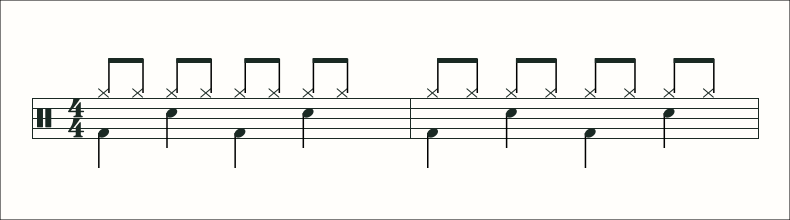
Drum notation identifies the kit voice and the rhythm of each hit. Read the kick, snare and cymbal parts together when they land on the same subdivision, or inspect the drum lanes separately to check a particular event. Our notation guide uses a simple backbeat to connect the written pattern with what you hear.
Read the drum notation guideHear the beat before changing it
Compare one or two bars with the recording. Listen for the kick pattern first, then the snare backbeat and the subdivision on the hi-hat or ride. Add fills after the basic groove is clear.
A drum-only take or stem makes this comparison straightforward. For a full-band recording, open the generated drum track and work on its rhythm separately from the pitched instruments.
From drum audio to MIDI
Export the drum part as MIDI for a DAW, where you can continue arranging and choose a drum sound. Keep a Note2Tabs project file when you want to preserve the editable workspace, or save the song to your account to practise it later.
Learn the transcription workflow
Our drum guide shows how to check a backbeat, recognise simultaneous kit hits and keep a fill aligned with the following bar.
Read the drum transcription guideDrums guides
- How to Transcribe Drums from a Recording
Check kick, snare, cymbals and fills in layers, then keep the groove editable for practice or production.
- How to Read Drum Notation
Read kit voices, subdivisions and simultaneous hits, with a simple backbeat you can hear in the editor.
- How to Write Drum Beats and Fills
Build a groove in layers, write a fill that lands on the next bar and check the arrangement with playback.
Frequently asked questions
Can I transcribe drums from an audio file?
Yes. Upload a recording, run the transcriber and open its drum track for playback and editing.
Can I edit the drum transcription?
Yes. Adjust individual hits, their timing and kit voices in the drum editor.
Can I export a drum transcription as MIDI?
Yes. Export MIDI to continue arranging the drum part in your music software.
Can I start with a YouTube drum cover?
Use the transcriber’s YouTube mode with a public video and select the passage you want to work on.