
Note2Tabs Bass tab editor
Free Online Bass Tab Editor
Write bass tabs online with four-string tablature, playback and export. Start a bass track in your browser, shape the bassline, and save your arrangement.
How it works
Start a bass track
Open a four-string bass track straight from this page. Start writing in guest mode, with no installation.
Write your bassline
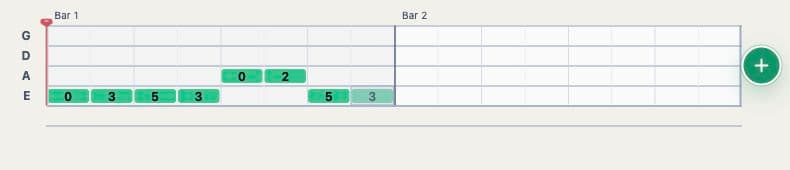
Enter fret numbers, shape note lengths and arrange the part into sections. Play it back as you work.
Keep playing
Loop a passage, adjust the fingering and export your tab. Sign in to keep the project in your library.
A tab maker built around the bass fretboard
Write riffs, grooves, walking basslines and complete song arrangements on a four-string bass guitar staff. Standard tuning follows E–A–D–G from the lowest string to the highest, so the tab reflects the instrument in your hands.
Choose the string and fret for each note, then adjust its rhythm on the timeline. Playback connects the notes on screen to the part you are learning or writing. The editor also offers a Drop D bass tuning for arrangements that use a low D string.
Write, listen and practise in the same project
Build a bassline a phrase at a time. Listen to the rhythm, move a note to another position and repeat the passage until the fingering feels right. Sections and playback loops help you work on a verse, chorus or difficult run without losing the rest of the arrangement.
Keep bass and guitar tracks together when writing for a band, or use a bass track on its own. Your bass part remains editable as the song develops.
Take your bass tab into your next session
Export a readable text tab to share a part, a MIDI file to carry the notes into another music tool, or MusicXML for a notation workflow. A Note2Tabs project file keeps the editor data for continuing your work.
If a recording is your starting point, open the audio transcriber and continue working on the part in the editor. If you already know the bassline, start with a blank bass track and enter it directly.
Frequently asked questions
Is the bass tab editor free?
Yes. You can open the bass editor in guest mode and start writing without an account. Sign in when you want to keep the project in your library.
Can I hear the bass tab while editing?
Yes. Use playback to hear the bassline, then adjust notes, timing and fretboard positions in the same project.
Which bass tuning does the editor use?
A new bass track uses standard four-string E–A–D–G tuning. You can also select Drop D for a D–A–D–G arrangement.
Can I write bass and guitar parts together?
Yes. Add bass and guitar tracks to the same project to arrange the parts together.
Can I export my bass tabs?
Yes. Export TXT, MIDI, MusicXML or a Note2Tabs project file from the editor.
Does the bass tab maker work in a browser?
Yes. Open Note2Tabs in your browser to write, play and edit bass tablature without installing software.