
Open or create a tab
Start with a blank tab, import a file, or continue from an audio transcription.
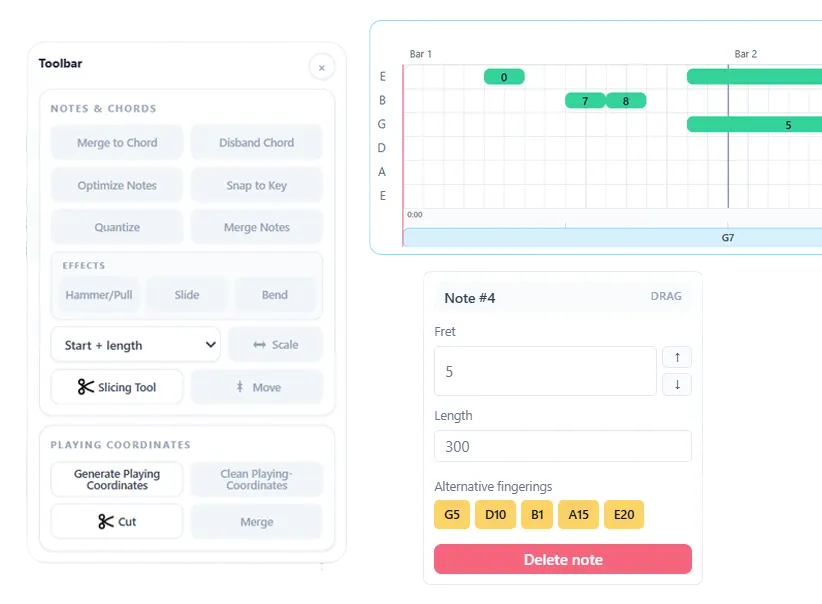
Find more playable string and fret positions, compare alternate fingerings, and generate practical cut positions for guitar-tab phrases.
Start with a blank tab, import a file, or continue from an audio transcription.
Set the fretboard position and compare the available string-and-fret choices for the same pitches.
Apply the fingering that fits your hand position, then split and organize the phrase for practice.
A pitch alone does not tell a guitarist where to play it. The same note can appear on several strings, and an individually correct fret choice can still make the complete phrase awkward. Note2Tabs keeps pitch and fretboard position connected so you can compare alternatives in context.
Use the fingering controls to move a line toward a practical hand position, review alternate positions for notes and chords, and keep the version that reduces unnecessary jumps. Cut positions help separate phrases and song sections without rewriting the notes around them.
Compare positions that produce the same pitch instead of treating every note as a fixed fret.
Keep neighboring notes in a more consistent playing area when that suits the riff.
Generate a starting set of cut positions, then add, move, or remove them to organize the phrase.
Automatic fingering is most useful as a starting point, not an irreversible answer. Note2Tabs lets you inspect the suggested string and fret, compare alternatives, and adjust the result when the next chord, slide, bend, or position shift changes what is comfortable.
Generate cut positions to divide the timeline into workable sections, then adjust them without rewriting the underlying performance. Cuts are useful for separating an intro from a verse, isolating a solo phrase, or creating smaller practice loops in any editor project. Automatic cut generation is available after saving the project to an account.
Open the editor in guest mode, then sign in only when you want to save your work.
It helps choose practical string and fret positions when the same notes can be played in multiple places on the guitar neck.
Yes. Suggestions remain editable, so you can choose a different string, fret, chord shape, or playing position.
No. Alternate positions can preserve the pitch while changing where it is played on the fretboard.
Yes. After saving a project to an account, you can generate a starting set of cuts and then add, move, or remove them manually.
Start blank, import a file, or begin with a transcription. No installation required.