
Note2Tabs Ukulele tab editor
Write ukulele tabs online
Create ukulele tabs on four strings with G–C–E–A tuning. Edit fret numbers and rhythm, hear the part with playback, and save or export your arrangement.
How it works
Start a ukulele track
Open a four-string track in standard high-G tuning, ready to write in guest mode.
Write the phrase
Choose strings and frets, set note lengths and arrange the melody into bars.
Listen and keep it
Check the rhythm with playback, then save your project or export the part.
Four strings, with the tuning that matters
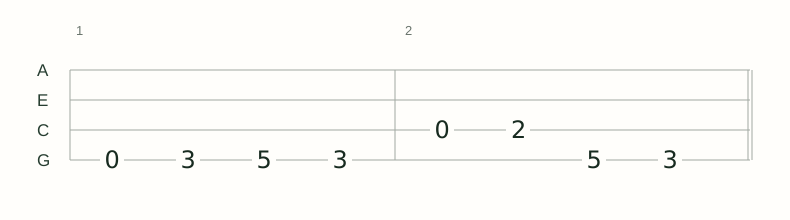
Standard ukulele tuning runs G–C–E–A from the fourth string to the first. The editor displays A at the top of the tab, followed by E, C and G, so fret numbers line up with the strings you play.
A high-G ukulele has a re-entrant tuning: the G string is higher than the C and E strings. Start in high G or choose the low-G preset when your instrument uses a lower fourth string. The fretboard mapping follows the selected tuning.
A tab maker for melodies and fingerpicking
Write a melody one phrase at a time, add the notes of a fingerpicked accompaniment and use playback to check how they fit together. Edit the string and fret when you want a more comfortable position without changing the musical idea.
Keep rhythm alongside fret numbers
A fret number tells you where to play, but the timing tells you when. Set note lengths, leave space for rests and listen through the bar before repeating the pattern. Keep sections together when arranging a longer song.
Read the ukulele tab guideUse your ukulele part beyond this session
Save a Note2Tabs project file to keep the tuning and editable part together. Export a text tab for reading or MIDI to carry the pitches and timing into another music tool. Sign in when you want the song in your library.
Ukulele guides
- How to Write Ukulele Tabs: High G and Low G
Understand A–E–C–G tab lines, choose the right G-string register and write a playable ukulele melody.
- How to Transcribe a Ukulele Melody
Review pitches and rhythm from a recording, then arrange the melody on four strings in your ukulele tuning.
- How to Practise Fingerstyle Ukulele with Tabs
Follow the melody and accompaniment, check simultaneous notes and practise transitions in high-G or low-G tuning.
Frequently asked questions
Which ukulele tuning does the editor open?
A new ukulele track opens in standard high-G G–C–E–A tuning. You can choose the low-G preset from the tuning controls.
Does the tab use four strings?
Yes. The lines are A, E, C and G from top to bottom, matching standard ukulele tab.
Can I create ukulele tabs for free?
Yes. Start in guest mode without installing software, then sign in to save the project to your library.
Can I hear or export the tab?
Yes. Use playback while editing, then export a text tab, MIDI or a native Note2Tabs project file.